Route 1/3 not in service over the summer
Route 1/3 will not be operating over the summer due to seasonal schedule adjustments. For details on summer service, visit Transit Routes & Schedules
Route 2 has been combined with the Route 1 on Saturdays
Route 2 has now been combined with the Route 1 on Saturdays, similar to evenings and Sunday service. This change is due to seasonal schedule adjustments. For details on summer service, visit Transit Routes & Schedules
Route 7 & Route 20 are now combined into Rides on Demand service Monday – Saturday 6:30 p.m. – 10:30 p.m. & all day Sunday.
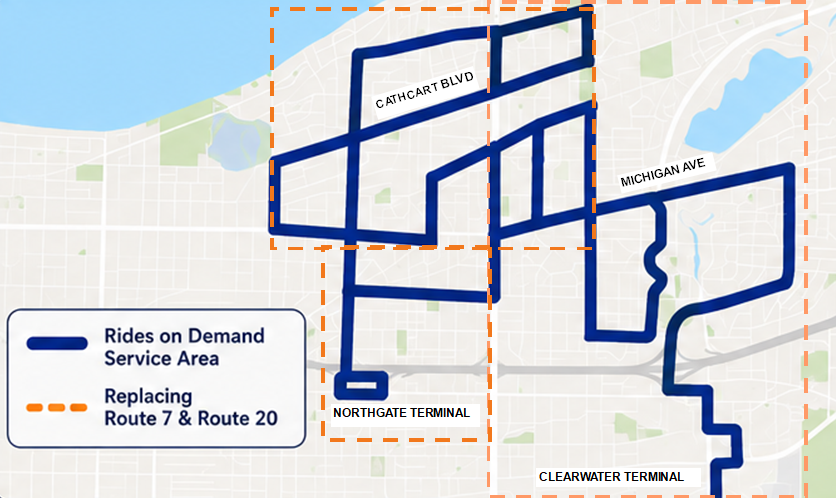
Rides on Demand is a service that allows you to request a ride via the Rides on Demand app in the specific on-demand service area, from the hours of 6:30 p.m. until 10:30 p.m., Monday to Saturday and all day Sunday. You can arrange to have a bus pick you up at a designated bus stop and take you to a stop of your choosing within the on-demand service area.
Regular transit fares apply.
On-demand service area and times
Rides on Demand operates in the designated service area, which includes; the Route 7 and Route 20 after 6:30 p.m. Monday to Saturday and all day Sunday.
The regular service schedule applies for the Route 7 and Route 20, Monday through Friday, 6:30 a.m. until 6:30 p.m. & Saturday 7:50 a.m. until 6:30 p.m.
Please consult the map below.
How It Works
Download the Rides on Demand app
- Apple iPhone/iPad users: Download from the Apple App Store
- Android users: Download from the Google Play Store
Create Account
- Open the app and register using an email address and phone number.
Book Ride
- Enter your pickup and destination locations.
- Choose your ride option and confirm your trip.
Track Vehicle
- Receive real-time updates and track your ride directly in the app.
Transfer connections to with other routes
If you require a transfer to another bus at either Northgate Terminal or Clearwater Terminal, select the appropriate terminal as your destination when booking your trip.
If you are travelling from one of these terminals to a stop within the service area, select the terminal as your pickup location.
Ride Alerts
Set up text alerts to get information about any rides you book with Rides on Demand. Once you are in app, you can add your mobile number where alerts will be sent. This feature can be disabled at any time.
Cancelling a booked ride
From the home page, you can select “Cancel Ride” under your pick up details
Unavailable ride notification
There will be instances when no rides are available and you will receive a message indicating this. Please be patient and try again.